Talk to the house
Home control with Sonos, Philips Hue and Apple TV, using an iPhone, Apple Watch, web app and Siri.
Talk to the house
R&D notes
We built a home control system that brings an Apple TV, Sonos speakers, and Philips Hue lights and sensors into one place. A Mac mini runs it, with controls through a web app, native iPhone and Apple Watch apps, and Siri.
You can choose moods that change the lights, music and TV together, check on the house, get someone's attention through the speakers and lights, or type and speak requests for a language model to handle.
The iPhone and Watch apps are being tested privately through TestFlight. We're also considering whether to release simpler versions that people could use in their own homes. Tell us if you'd use them.
The apps
Everything goes through one set of controls on the Mac mini, so each new way in can do the same things.
Moods, what's playing with album art, an Apple TV remote, the lights, house status, and getting someone's attention, including a recorded voice message.
Moods, play and pause, the Digital Crown for speaker volume, and a voice message home, from the wrist.
The full set of controls in a browser: remote, music, speakers, every light and sensor setting, moods, and the router.
"Hey Siri, goodnight", "washing up" or "ask the house", from the phone, the Watch or the Action button.
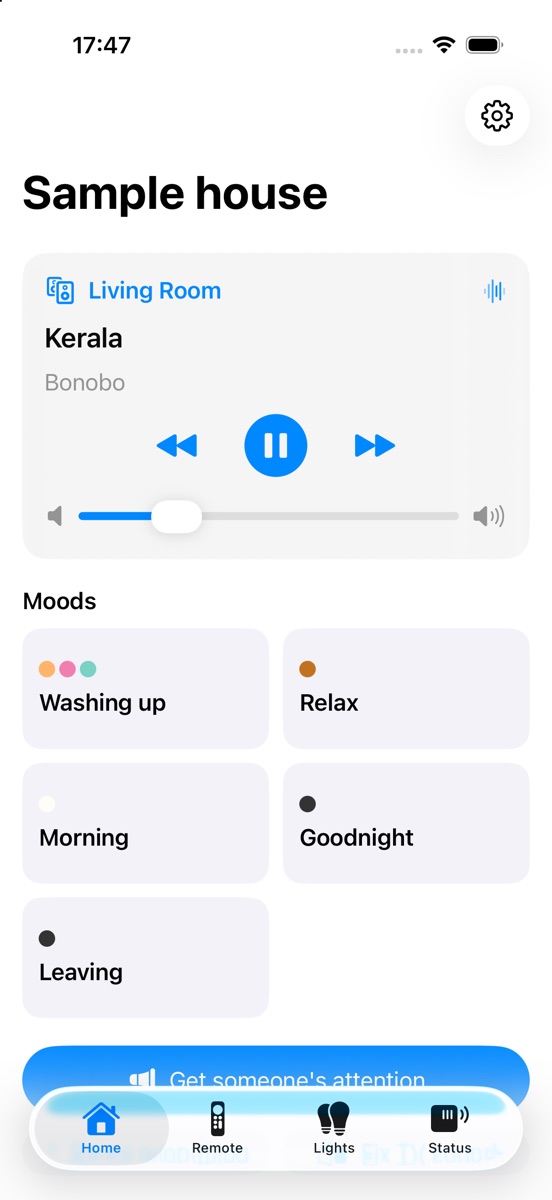
The iPhone app, here showing its built-in sample house.
A phone is paired by scanning a code on the web app, and each phone or Watch gets its own key, which can be cancelled on its own if a device is lost. Requests from outside the house are authenticated, and the router controls can't be reached from outside at all.
What it controls
A remote laid out like the real one, now playing with artwork and a scrub bar, and keyboard control from a laptop.
Each room's volume and sound settings, grouping, and the audio format the soundbar is receiving (stereo, 5.1 or Dolby Atmos).
Rooms and scenes, every light's colour and warmth, the motion sensors' settings and automations, schedules, and a film mode that restores the lights afterwards.
When the children's devices are online, with "block now" and "extra time" from a phone.
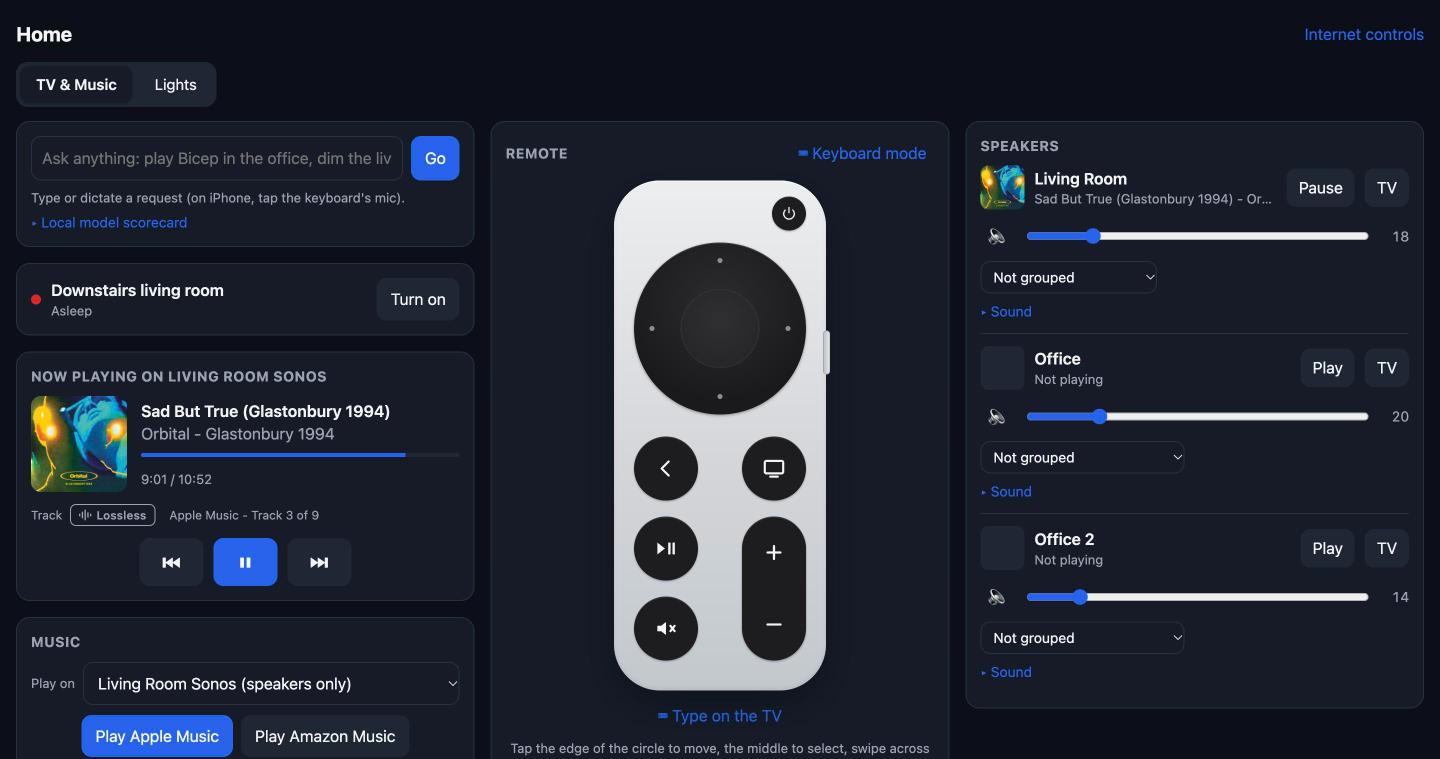
The web app: music playing on the living-room Sonos, with the remote and each room's volume.
The app talks to each device directly on the home network rather than through the manufacturers' cloud services. Responses are quicker, and it carries on working if one of those services is down.
Equipment that isn't on the network, such as an older TV or an HDMI switch, can be brought in with a small Wi-Fi infrared transmitter. It learns the codes from the original remote (or uses a published set) and sends them on request, so the same app can switch the TV on, change its input or change the HDMI switch to the Apple TV.
Moods
A mood is a saved set of lights, music and TV. "Washing up" turns the kitchen lights to a colour scene and starts a radio station on the nearest speaker, then pauses the music once the kitchen's motion sensor has seen nobody for ten minutes. "Goodnight" turns every light off, pauses every speaker, sleeps the TV, and says which rooms were left on and how warm the house is. Moods are edited in the web app and appear in the iPhone and Watch apps and in Siri straight away.
Getting someone's attention
This one came from being locked out while someone inside had headphones on. One button plays a message on chosen speakers, flashes the lights in a chosen room, and can pause the children's internet for five minutes. Each part also works on its own. A message can be typed, and read out by a computer voice, or recorded on the phone or Watch. Whatever the speaker was playing carries on afterwards.
House status
The motion sensors also measure temperature and light, so the house can say which rooms have had movement recently, which are cold, and what's on. A note appears once when a sensor's battery is nearly flat, when a sensor stops responding, or when a room drops below a chosen temperature, and not again until something changes.
How it started
It began when the Apple TV remote went missing. The Apple TV can be controlled over the home network, so we put a remote in a web page. We added the Sonos speakers next, then the Hue lights, then the router's parental controls, which were already running on the same Mac mini. The apps came once the web page had settled into a set of controls worth having in a pocket.
Typed and spoken requests
A box at the top of the web app takes requests such as "dim the living room to 30% and put the film on" or "play the new Bicep album in spatial in the living room". A language model turns each one into a list of steps, using the actual names of the rooms, scenes and apps in the house. Music is looked up in Apple Music's catalogue, and when spatial audio is asked for it picks the Dolby Atmos version if there is one, or says there isn't.
Other requests it handles include "put Bluey on Disney+", "play Orbital in the back room at 20%", "film mode for two hours", "snooze all the sensors until morning", "make a playlist of 90s house" (saved to Apple Music) and "set the mood for washing up". It keeps the last few requests, so "try again" (after logging in to an app, for example) and "a bit louder" work. If part of a request can't be done, such as a room with no lights in it, the reply says so.
Running the language model on the Mac
The first version sent every request to a cloud model. Recent Macs include a small language model that runs entirely on the device, so we now run the two side by side. The cloud model's plan is the one carried out; the local model plans the same request in the background and the results are compared.
So far the local model gets simple requests right, such as setting a speaker's volume or turning all the lights off, and answers in a second or two. It makes mistakes on longer requests that mix lights and music, for example mixing up the Sonos and Hue names for the same room. We'll move each type of request over to it once it's reliable, and keep the cloud model for things like finding where a film is streaming.
Episodes on Disney+, and iPlayer
Disney+ and Apple Music open straight to a title when the Apple TV is sent a link. BBC iPlayer on Apple TV doesn't accept links at all, even the ones BBC registers for its iPhone app. Disney+ links go to a show rather than an episode, so asking for episode 3 would play whichever episode Disney+ thinks you're on.
For episodes, the app opens the show and moves through the menu with remote presses to the episode asked for. The starting position in the menu varies, so it sometimes landed on the wrong one. Disney+ reports the episode that's playing (for example "S1:E4 Malware"), so the app now checks it and, if it's wrong, goes back and moves up or down by the difference.
Film mode and TV sound
When a film or show starts on the Apple TV after dark, the living room lights go off for a film or down to their lowest for a TV episode, and the motion sensors stop switching lights on. When it's paused or stopped, the lights go back to how they were. If film mode has been started by hand with a timer, the automatic version leaves it alone.
Twice in one evening the TV kept its picture but stopped sending sound to the soundbar, a known fault with the HDMI audio (eARC) link. The app can see this happening, because the soundbar reports no audio while the Apple TV reports playing. A "fix sound" request re-selects the soundbar's TV input and, if that doesn't work, switches the TV off and on through the Apple TV. The first version also did that when nothing was playing, so it now checks first.
Problems we found
Reading the soundbar's input format showed that a film with a Dolby Atmos soundtrack was arriving as plain 5.1, and Atmos music as stereo. The sound was being reduced somewhere between the Apple TV, an HDMI switch and the TV, and nothing on screen showed it.
Two of the connections, to the Apple TV and the router, use interfaces their makers don't publish. A macOS update also stopped the app reaching the network until the permission was granted again. We keep a runbook of each fix.
The house has two separate networks, one from the broadband router and one from a second router. Devices move between them on their own, usually after a brief drop in Wi-Fi, and the two Sonos systems turned out to share one identity, so the app had to look for speakers on both networks and remember each one it had seen. Plugging the living-room equipment into the router by cable stops the moving.
Most of the work went into the behaviour of the devices and apps rather than the language model: which apps take links, how long the TV takes to wake over HDMI, and when "no audio" is normal.
Could we release the apps?
We're looking at making some of this available as a small set of iPhone and Apple Watch apps. The idea is to control Sonos speakers and Philips Hue lights directly over the home network, with Apple Music, without needing a Mac mini or a server run by us.
It's still an experiment and we haven't decided whether to release anything. Some of the features in our own home system, particularly Apple TV control and the router, rely on interfaces their makers don't publish and may not be suitable for a public App Store release. Streaming and music search would still need the internet.
If you'd find something like this useful, we'd like to hear which parts matter to you.
Thanks. If you'd like us to let you know if the apps become available, you can leave your details below.
Beyond the house: physical effects
Some of our work for immersive shows has used physical effects such as wind, haptics, heat and scent, timed to what's happening on screen or around an audience. There's no particular reason similar effects couldn't be tied into the same controls at home.
It could make for interesting experiments with films, games and other entertainment, with lighting, sound and physical effects responding together. That's something we'd like to explore rather than anything built into the house so far.
What's next
- An Apple TV app with the moods as tiles, and widgets for the phone's Lock Screen and the Watch face.
- A mood that runs when a phone arrives home.
- More equipment: door sensors so "goodnight" can say whether the back door is shut, buttons on the wall for a mood, and the infrared transmitter for the TV and HDMI switch.
- Moving more requests to the language model that runs on the Mac.
Bespoke versions
The same approach could suit a venue or an exhibition that needs a space to respond reliably to visitors, or a household that wants something built around its own equipment. If that's you, use our contact form and tell us a little about the space and what you'd want it to do.
Questions people ask
- Can Sonos and Philips Hue be controlled from one app?
- Yes, in a few ways. Sonos's own voice assistant can control Hue lights (in US English and French), Philips has announced Hue switches that control Sonos playback, and some independent apps cover both. We built our own so that moods can set the lights, music and TV together, from an iPhone, an Apple Watch or Siri.
- Does it need a Mac mini?
- Our own system runs on one, because it also handles the Apple TV, the router and the language model. A public version would be designed to talk to Sonos and Hue directly from the phone, without a computer running at home.
- What do the iPhone and Apple Watch apps do at the moment?
- Moods, what's playing with play, pause and volume, an Apple TV remote, the lights, the state of the house, and messages or flashing lights to get someone's attention. They're being tested privately through TestFlight.
- Would Apple TV control be included in a public release?
- Probably not at first. Controlling an Apple TV relies on interfaces Apple doesn't publish, which could cause problems in App Store review and later updates.
- Does it work without the internet?
- Mostly. Hue, Sonos and the Apple TV can all be controlled on the home network with the internet down. Streaming, music search and a cloud language model need it; a model running on the device doesn't.
- Why is my Sonos only getting stereo or 5.1 from my Apple TV?
- Usually something in the HDMI chain is telling the Apple TV it can't take more: the TV, a switch or a receiver. With its Audio Format on Auto, the Apple TV sends the best it's told is supported. Try the Apple TV plugged straight into the TV's eARC-friendly input, check the TV's audio output settings, and see what the soundbar says it's receiving (the Sonos app shows it).
- My Sonos has no sound from the TV but the picture is fine. What fixes it?
- Re-select the TV input on the soundbar first. If that doesn't do it, switch the TV off and on again: it restarts the HDMI audio (eARC) link between the TV and the soundbar, which was what worked for us. Check the TV hasn't switched its sound back to its own speakers, too.
- Can I control a TV or other equipment that isn't on the network?
- Usually, if it has an infrared remote. A small Wi-Fi infrared transmitter placed where it can see the equipment learns the remote's buttons, and an app can then send them: power, inputs, volume and menus.
- How does this compare with Home Assistant?
- Home Assistant is excellent and connects to far more devices. This project is narrower: a few devices, moods across them, native Apple apps, and checking that each request actually did what was asked.
Apple TV, Apple Watch, Apple Music, Siri, Sonos, Philips Hue, Disney+ and BBC iPlayer are trademarks of their owners. We're not affiliated with any of them.